Digital Printing: Dry toner vs UV inkjet for labels: which digital printing technology should you choose?
 PPDS
PPDS
Short answer. Choose dry toner when fine detail, natural or uncoated papers and food-contact labels matter most. Choose UV inkjet when you want high gloss, tactile effects, strong chemical and scuff resistance or higher press speeds. Neither wins everywhere. The right choice depends on what the label has to survive and where it ends up, and many converters run both [1].
What is the difference between dry toner and UV inkjet?
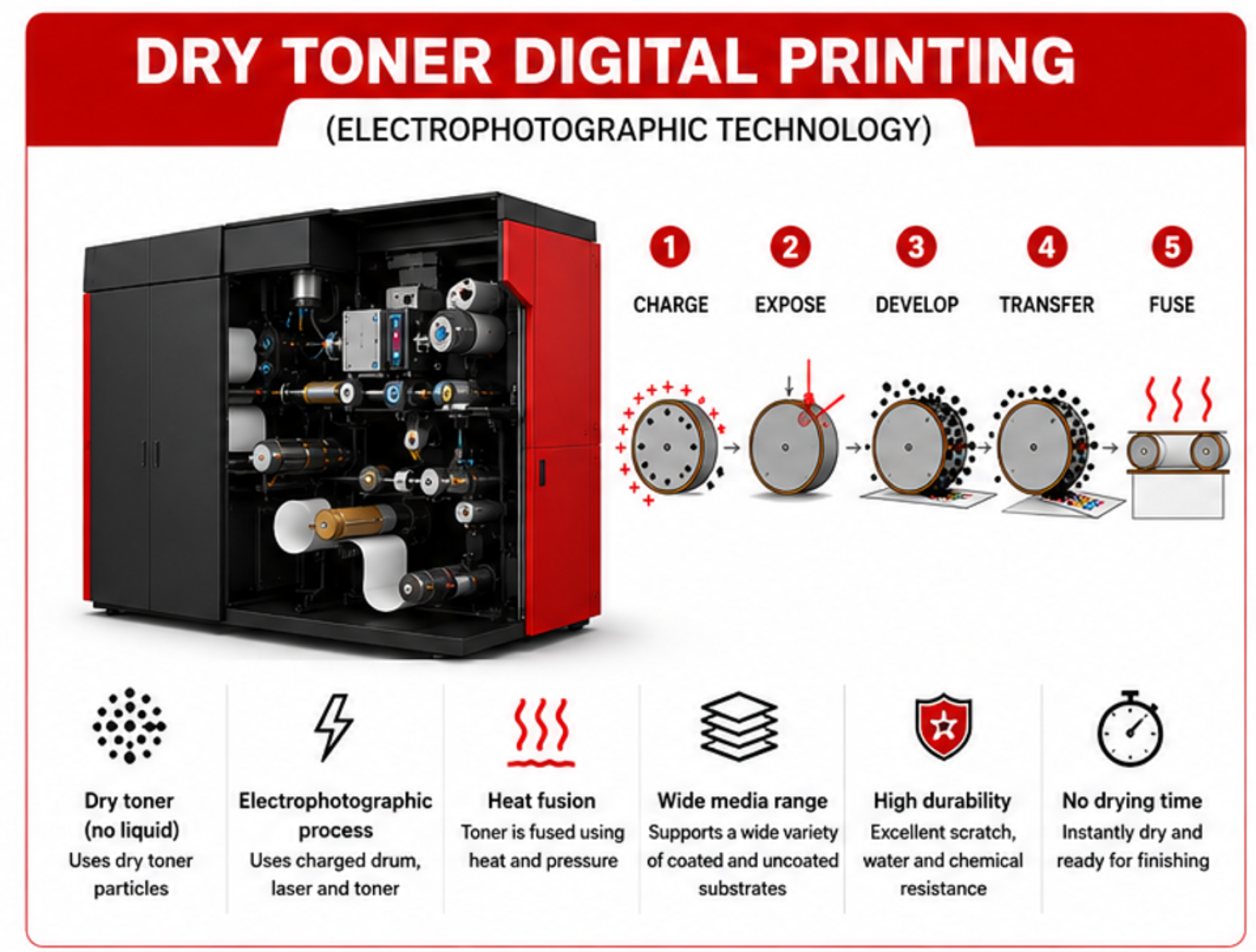
The difference is how the image reaches the label. Dry toner is electrophotography: an LED array or laser writes an electrostatic image on a drum, charged toner powder with particles of about 8 µm sticks to it, transfers to the label stock in direct contact and is fused with heat into a thin, solid polyester film [1]. UV inkjet fires picolitre drops of liquid ink from piezo print heads across a gap of about 1 mm onto the moving web, then cures them with UV light into a cross-linked film [1].
Two other digital processes exist, liquid toner and water-based inkjet. They are covered briefly further down.
How do dry toner and UV inkjet compare?
Dry toner | UV inkjet | |
|---|---|---|
How the image forms | Toner transferred in contact from a drum, fused with heat | Ink drops jetted across a ~1 mm gap, cured with UV light |
Native resolution | 1200 dpi on label presses [1] | Historically 360 to 600 dpi; 1200 dpi heads now on the market [1][5] |
Dot placement | Very precise, little dot gain [1] | More exposed to drop placement error and satellite drops [1] |
Printed layer | About 4 µm, satin finish [1] | 4 to 6 µm, high gloss; matte options emerging [1][5] |
Tactile effect | Some | Medium to high [1] |
Scuff, chemical and heat resistance | Moderate; varnish or lamination often needed, though newer UV-hardening toners close the gap [1][4] | Strong without extra layers [1][4] |
Uncoated and natural papers | Prints without primer [1] | Primer usually needed [1] |
Films | Good; needs stable substrate conductivity [1] | Good when surface energy is right; primer or corona sometimes needed [1] |
Food-contact migration | Inherent advantage: large polymer molecules with low tendency to migrate [2] | Harder: small monomers and photoinitiator fragments can migrate if curing is incomplete [1][2] |
Press speed (example) | About 20 to 42 m/min on current toner label presses [7] | Up to about 70 m/min on current UV inkjet label presses [7] |
Waste and operator | No hazardous chemical waste; ozone filter [1] | Ink and flush residues handled as chemical waste; UV shielding and ozone filter, unless UV-LED [1] |
General comparison. Exact performance depends on the press, the consumables and the substrate, so test on your own materials.
Which gives sharper detail?
Dry toner, at the same native resolution. Toner is transferred in direct contact, a few microns from the drum, so dots land exactly where they are written and keep their size [1]. Inkjet drops travel about 1 mm through moving air, where turbulence, web tension and satellite droplets can shift them, which is why most inkjet presses use stochastic (FM) screening to hide placement noise [1]. For fine text, guilloches, small codes and pharma labels, that precision matters. The gap has narrowed as 1200 dpi inkjet heads have arrived [5].
Which is better for food labels?
Dry toner has the inherent advantage. Migration, the transfer of substances from the print into the food, depends mainly on molecule size: the larger the molecule, the less it moves. Fused dry toner is a solid polyester film of large molecules, while UV inkjet relies on small reactive monomers and photoinitiators that can remain if curing is incomplete [2]. Incomplete curing can come from thick layers, pigments absorbing UV, ageing lamps or oxygen at the surface [1]. UV inkjet can still be used for food packaging, but it may need a functional barrier or extra finishing [4].
In Europe, food-contact materials fall under Regulation (EC) No 1935/2004, and printing inks follow the EuPIA guideline and good manufacturing practice [8][9][10]. Compliance is a property of the whole construction and its documentation, so always ask for the compliance documents for your exact application.
Which is more durable?
UV inkjet, out of the press. Its cross-linked layer resists scuffing, chemicals, heat and water without extra layers [1]. Dry toner prints are solid polymer films that can soften with heat and are more exposed to chemicals and scratching, so labels for industrial, chemical, household or health and beauty use usually get a UV varnish or lamination [1]. Newer UV-hardening toners reduce that gap [4].
What about substrates and primers?
Dry toner sits on top of the paper and bonds without a primer, including on uncoated and textured natural papers, which is why it suits wine and spirits labels [1]. UV inkjet ink is low in viscosity and can sink into porous paper, where UV light cannot cure it, so a primer is usually needed on papers [1]. On films, both work well; inkjet may need a primer or corona treatment for adhesion, while dry toner needs substrates with stable electrical conductivity, which for papers means controlled moisture [1].
Which is more reliable?
Sources disagree here. Xeikon's technical paper argues electrophotography is the more stable process, because inkjet quality depends on every nozzle firing straight, and nozzles can clog, dry out or deflect [1]. An independent buyer's guide notes the other side: inkjet presses have a simpler build and tend to need less maintenance than toner presses [4]. In practice, ask reference sites running work like yours for real uptime and maintenance data.
What about liquid toner and water-based inkjet?
Liquid toner is also electrophotography, with much finer particles of about 2 µm carried in mineral oil. It gives very thin layers and fine detail, but usually needs a primer for adhesion [1]. Water-based inkjet produces very thin layers and no hazardous chemical waste, but needs primers on many substrates and gives lower opacity for white [1].
Is inkjet taking over from toner?
Not yet, but it is gaining. Toner still makes up most of the installed base of digital label presses, while inkjet installations have been growing faster for years, about three quarters of them UV [6]. Analyst firm I.T. Strategies put inkjet at about 20% of digital label print volume at the end of 2020, with the share expected to rise [4]. As 1200 dpi inkjet reaches label quality at higher speeds [5], the choice is becoming less about quality and more about the job.
How do you choose for your labels?
Start from the label's end use:
Label type | Usually the better fit | Why |
|---|---|---|
Wine and spirits on natural or uncoated papers | Dry toner | No primer; toner sits on top of the paper [1] |
Food labels and food packaging | Dry toner | Lower migration potential [2] |
Pharma: fine text and small codes | Dry toner | Precise dot placement at 1200 dpi [1] |
Industrial, chemical, household, health and beauty | UV inkjet | Resistance without lamination [1] |
Premium tactile or high-gloss effects | UV inkjet | Thicker, glossy layer [1] |
Heavy white on clear film | Test both | Dry toner gives high single-pass opacity; UV inkjet can match screen white at lower speeds with large drops [1] |
If your work spans several rows, you may need both. Digital front-ends exist that drive different press technologies from one workflow [1].
INNVESTIO Group works with Xeikon (Flint Group), which builds both dry toner and UV inkjet label presses, so we have no reason to push one over the other. We start from your label mix and recommend the technology, or the combination, your work needs. Deciding between digital and conventional first? Free technical papers are in our whitepaper download center.
Not sure which fits your labels? Tell us what you print and we will come back with a way through, not a sales pitch.
[Talk to us Print, Packaging & Food Ingredient Solutions | INNVESTIO Group ]
Frequently asked questions
Is dry toner or UV inkjet better for food labels? Dry toner has an inherent migration advantage because its fused polyester layer is made of large molecules. UV inkjet can be used, but small monomers and photoinitiators can migrate if curing is incomplete, so it may need a functional barrier. Always check the compliance documents for your application.
Does UV inkjet print as sharply as dry toner? Dry toner places dots more precisely at the same resolution, which helps fine text and small codes. Modern 1200 dpi inkjet heads have narrowed the gap considerably.
Which is more durable? UV inkjet, without extra layers: its cured film resists scuffing, chemicals and heat. Dry toner labels for demanding uses usually get a UV varnish or lamination.
Do I need a primer? Dry toner prints on most papers without primer. UV inkjet usually needs a primer on porous papers and sometimes on films.
Can one plant run both? Yes. Many converters run both, and digital front-ends exist that drive different press technologies from one workflow.
References
White papers
- L. Deprez, Xeikon, white paper Digital label printing technologies: No one size fits all (2017). https://www.innvestio.nl/hubfs/2026%20INNVESTIO%20sites%20files/Labels%20XEIKON%20Digital%20label%20printing%20technologies%20-%20No%20one%20size%20fits%20all.pdf
- L. Deprez, Xeikon, white paper Food Safety and Digital Printing (2012). https://www.innvestio.nl/hubfs/2026%20INNVESTIO%20sites%20files/Labels%20XEIKON%20Food%20Safety%20and%20Digital%20Printing.pdf
- INNVESTIO NL, Digital Label Printing Whitepapers download center. https://www.innvestio.nl/en/innvestio-nl-digital-label-printing-whitepapers
Independent analysis and trade press
- WhatTheyThink, "Inkjet Shopping Guide: Label Presses, Part 1" (citing I.T. Strategies). https://whattheythink.com/articles/125346-inkjetinsight-inkjet-shopping-guide-label-presses-part-1/
- Label and Narrow Web, "Digital Print Market Update" (2025). https://www.labelandnarrowweb.com/digital-print-market-update-197087/
- Labels & Labeling, "Digital printing now growing beyond labels". https://www.labelsandlabeling.com/opinion/digital-printing-now-growing-beyond-labels
- Xeikon, product range and press specifications. https://xeikon.com/en/products
Regulation and guidelines
- Regulation (EC) No 1935/2004 on materials and articles intended to come into contact with food, EUR-Lex. https://eur-lex.europa.eu/eli/reg/2004/1935/oj
- EuPIA, Guideline on Printing Inks applied to Food Contact Materials (2023). https://www.eupia.org/wp-content/uploads/2023/06/2023-05-18_EuPIA-Guideline-on-Printing-Inks-applied-to-Food-Contact-Materials.pdf
- EuPIA, Good Manufacturing Practice (GMP) Printing Inks for Food Contact Materials, 5th version (2025). https://www.eupia.org/wp-content/uploads/2025/11/2025-11-05_EuPIA_GMP_5th_version.pdf